QuotaBar is a lightweight Tauri menubar app that watches your Claude Code, Codex, Cursor, and Grok usage — live quota windows, per-provider tray indicators, and local cost estimates computed on-device. Antigravity is hidden until its quota can be tracked.
Features
QuotaBar polls Anthropic, ChatGPT, Cursor, and Grok in the background using the local credentials you already have. The local app reads credentials and sends them to the relevant provider for quota checks. Cost estimates stay on-device.
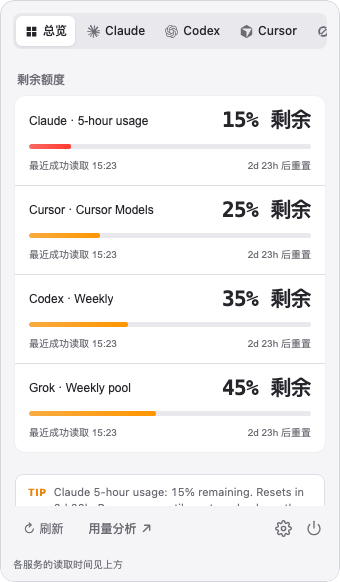
Real-data 5-hour, 7-day, Opus, Sonnet, and weekly windows per provider, with reset times shown as days plus hours when available.
Independent menu bar indicators for each provider. Enable or hide each tray while keeping at least one entry point.
Today, week, and month cost estimates for Claude Code, Codex, and Cursor — derived offline from on-device logs.
Reads Claude Code OAuth credentials without ever refreshing or writing tokens. Your auth material stays untouched.
Refreshes every 60 seconds, backs off to 5 minutes on 429 rate limits and to 1 hour on auth failures, serving stale cache in between.
A native-feeling popover shell with provider cards, theme options, macOS Hide Dock, and per-provider tray controls.
Providers
Tray percentages represent remaining quota. A low percentage means the selected provider is close to its limit; reset times appear in the panel.
Get started
Download the installer for your platform, or build from source with Node.js and the Rust toolchain.
Grab the .dmg for macOS or the .msi / .exe for Windows, or the .AppImage for Linux x64, from GitHub Releases.
QuotaBar reads existing local auth — claude login, ~/.codex/auth.json, Cursor, or Grok Build. It never manages login flows itself.
Open QuotaBar, click its tray icon, and use Check connection after provider sign-in. Overview shows remaining quota and reset times; open Usage analysis for local projects, sessions and history. The desktop workspace stays closed until you open it.
# Build from source $ git clone https://github.com/majiayu000/quotabar.git $ cd quotabar $ npm ci $ npm run tauri dev # Local macOS app bundle $ npm run tauri build -- --bundles app
Building from source requires Node.js with npm, Rust, and the Tauri prerequisites for your OS. These tools are not required to run a downloaded installer.
Usage guide
Install QuotaBar, sign in through your provider's own app or CLI, then use Check connection in QuotaBar. Click a tray icon to inspect its windows and reset times. The tray percentage means remaining quota; the provider guide explains which window each icon selects.
A missing connection or failed provider request is not zero usage. Check your provider's sign-in and retry Check connection. QuotaBar backs off after authentication errors or rate limits and may show a marked cached reading. Antigravity is hidden until its quota can be tracked. See provider limitations before reporting an issue.
No. Cost estimates use local token logs and model prices; quota windows describe your provider's usage limits. A dollar estimate does not establish how much your subscription costs or how much quota remains. For date-bounded CLI reports and JSON/CSV exports, see ccstats, the separate analytics SDK used by QuotaBar.
Interactive sign-in stays with your provider. Quota checks contact the provider using existing local credentials; local cost computation stays on-device. Read the data and security notes, or report a connection problem without including tokens or session files.